
Grid Improvements in Dynamics CRM 2011
Roshan Mehta, 03 March 2011
The grid view in Dynamics CRM 4.0 provides a nice way to view your companies CRM data. The grid view allows you to sort by columns, resize columns, search for records based on data stored in any attribute, and open up related records. The grid view can also be customized to add/remove fields, configure the default sorting criteria, and define the searchable fields. Dynamics CRM 2011 offers all of these features, plus a few more new features to simplify user interaction with records within the grid.
One of the down-sides of the CRM 4.0 grid view is that it does not tell you the total number of records for an entity. You would have to multiply the number of records per page by the number of pages to get this record count. Many customers have requested this feature, and it’s nice to say that this is supported in CRM 2011.
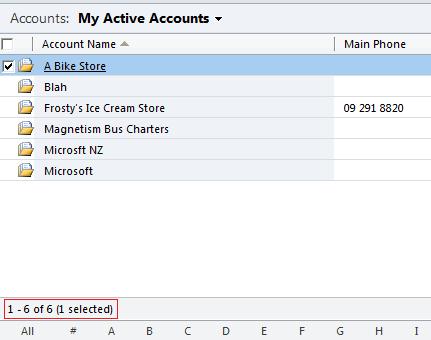
We can see the total record count at the bottom of the grid view. One thing to keep in mind is that if there are more than 5000 records for a given entity, the record count will be displayed as 1 – 250 of 5000+ (assuming you have set the records per page to 250 in your personal options). The reason for this limit is that fetchxml only retrieves a maximum of 5000 records at a time.
The next improvement is the ability to create custom personal views straight from the grid. In previous versions, to create a custom personal view, you would have to navigate to Advanced Find and save the result as a personal view which you can then share with other Users or Teams in your system. This process is not obvious for new users of CRM.
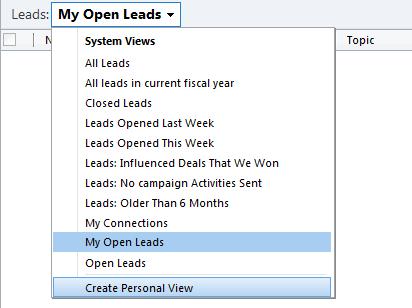
Notice the option to Create Personal View. This is available on all view selector drop-downs and opens up the Advanced Find window where you can define the parameters of the new view you are creating.
CRM 2011 also allows you to set your own default view. Simply navigate to a view for an entity, click on the View tab on the ribbon and then select Save as Default View. For example, before performing this step, the default view for Accounts is Active Accounts. I can then select another view such as Accounts: Responding to Campaigns in Last 6 Months and set this as my default view. Next time I access CRM (even from a different computer) my new default view will be displayed when I navigate to Accounts.
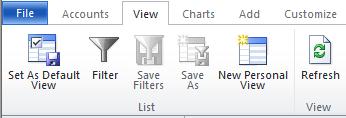
This feature is not available in CRM 4.0. The system administrator would need to decide which view will be set as the default view for all users in the system through the customization area.
Lastly, I want to talk about Sticky Views. In Dynamics CRM 4.0, let’s say that Active Accounts is the default view for all users. I am working with My Active Accounts. I then navigate to the Leads area to check some information, and then return to Accounts. The Active Accounts view is presented to me, which is not the view I was last working with. CRM 2011 has the ability to remember which view you were last working with when you navigate between different entities which is known as sticky views. This will reduce the number of clicks and allow to you quickly get back to what you were doing, should you need to access other parts of the system.
There are some other features available within the grid view itself such as filtering which you can find out more about by clicking here.
Category List

Filter by Author
Adam Murchison
Alfwyn Jordan
Arthur Mandisodza
Calum Jacobs
Colin Maitland
David Mochrie
Dominic Liu
Gayan Perera
Harshani Perera
Isaac Stephens
Jaime Smith
Jared Johnson
John Barrencechea
John Eccles
Lauren Withers
Paul Nieuwelaar
Roshan Mehta
Roz Millar
Ryan Blaikie
Ryan Ingram
Sarah Coleman
Sean Roque
Shalane Williams