

Dynamics CRM 2011 – A Closed Loop System
Louise Alderton, 01 January 2011
To continue my Microsoft Dynamics CRM 2011 discovery I have decided to re-evaluate the concept of ‘Closed-Loop Marketing’, a topic I blogged about a few months back relating to Dynamics CRM in a general sense. You can check out this previous post here.
Now, I would like to examine if and how Microsoft Dynamics CRM 2011 has improved on closing the loop, not only for marketing, but all of your business departments.
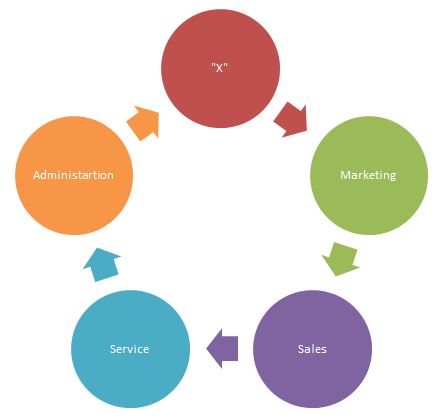
First of all let me re-cap some of the main ideas in my previous post. Despite all the technology available in today’s world, many organisations still have a disconnect between sales and marketing, and other departments for that matter. This kind of division can be the centre of inefficiency as each department is unable to support the other. A solution to such an issue is to implement a ‘closed loop’ system.
The concept of a Closed Loop system refers to creating a common point of reference, in this case Microsoft Dynamics CRM is a great reference, allowing each department to have the ability to view an overall picture of the organisation and the going-ons in each individual department. The above image demonstrates this concept that each and every department is connected in the ‘loop’. The ‘X’ can represent whatever is an important component within your business, and of course with the idea of xRM you are not restricted to any specific areas. The ideal outcome of such a system is to create a central hub for everyone where the exchange of data is simplified and each area is able to support and enhance another.
This is precisely what Microsoft Dynamics CRM can do for you. This system has the capability to coordinate interactions between various business functions and in many cases automate processes to create efficiency. Of course Dynamics CRM 2011 has all of this ability and then some.
One particular new feature in Dynamics CRM 2011 that enhances this closed loop concept is Connections. This feature is similar to the ‘Relationship Roles’ feature in CRM 4.0 only without the restrictions. You can still use Relationship Roles in CRM 2011 but this only allows you to link Accounts, Contacts and Opportunities. With Connections you can relate pretty much anything to anything.
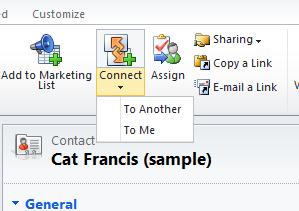
You can both link something to yourself or to another and also add a description of the connection. Adding a description to the connection can add great value. For example you might relate two contacts and describe that one person was referred to you by the other. Or you might relate one Case to another Case, which could be very relevant but only if is clear how they relate to each other.
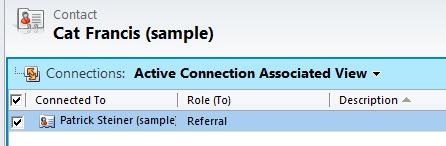
Utilising this feature will allow you to create a rich profile around each record by creating this web of connections linking it to other records. You will not only be able to communicate with your customers more effectively but also have an overview of how your work is then connected to other departments within your organisation. You can see unique information on a particular record that was not previously possible.
Creating a closed loop system is a smart way to do business but will require the input of people, processes and technology to be implemented as successfully as possible. My best guess would be that with such a system you will experience greater productivity within your organisation – the very thing CRM 2011 prides itself on.
Category List
Filter by Author
Adam Murchison
Alfwyn Jordan
Arthur Mandisodza
Calum Jacobs
Colin Maitland
David Mochrie
Dominic Liu
Gayan Perera
Harshani Perera
Isaac Stephens
Jaime Smith
Jared Johnson
John Barrencechea
John Eccles
Lauren Withers
Paul Nieuwelaar
Roshan Mehta
Roz Millar
Ryan Blaikie
Ryan Ingram
Sarah Coleman
Sean Roque
Shalane Williams