

Microsoft Dynamics CRM 2011 Pin Views and Records
Simon Phillips, 26 October 2010
Do you have a record or view in Dynamics CRM that you use every day? Are you sick of navigating to that view or having to manually find that record you are after? Well in Dynamics CRM 2011 all these issues have been solved with the ability to pin views and records - Like having your own built in favourites!
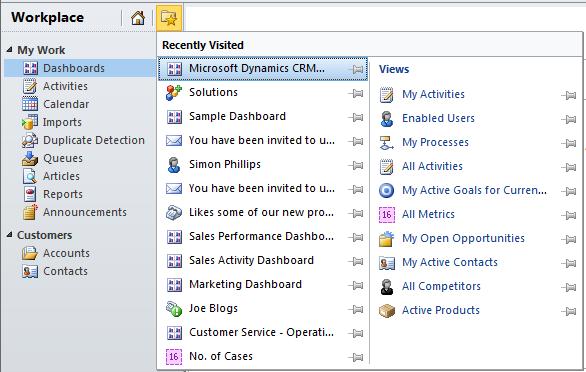
As you can see from the image above you can access the favourites by clicking the button that looks like a folder with a star on it (Short-cut Ctrl+Shift-7). A list of your previously visited views and records will be displayed, this list will keep getting over-written with the different views and records that you visit so to save you favourites all you have to do is click on the pin to pin it as a favourite.
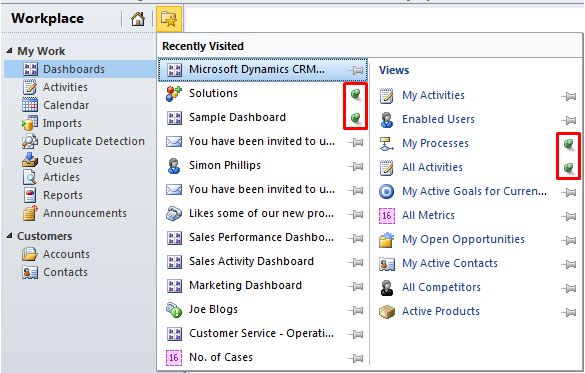
The highlighted pins show what it will look like when you pin a view or record as a favourite, Pinned views or records will stack up from the bottom so once they reach the bottom they will not get pushed off they will just stay there. You can have a max of 10 pinned views and 15 pinned records
From these lists you can also right click them after you right click them you have 3 options:
• Pin item
• Copy a Link
• E-mail a Link…
So rather than having to go to the view or record and then copying/emailing the link you can do this directly from the favourites box. Enjoy!
Category List

Filter by Author
Adam Murchison
Alfwyn Jordan
Arthur Mandisodza
Calum Jacobs
Colin Maitland
David Mochrie
Dominic Liu
Gayan Perera
Harshani Perera
Isaac Stephens
Jaime Smith
Jared Johnson
John Barrencechea
John Eccles
Lauren Withers
Paul Nieuwelaar
Roshan Mehta
Roz Millar
Ryan Blaikie
Ryan Ingram
Sarah Coleman
Sean Roque
Shalane Williams