

How to add both Text and Data fields in a Textbox or Table Cell in Microsoft Dynamics CRM 4.0
Simon Phillips, 11 August 2010
With SQL reporting, it isn’t always sufficient to be able to just place data fields on to the report. Sometimes, you need to add what is being displayed on the report; you may want to display that data inside of a sentence or part of another word. I came across the need for this when creating a report for Magnetism.
I had to create a report that showed the Invoice ID. But, alone on a report this makes no sense for the user; it is just a random number. It seemed logical to add “Invoice #” to the start of it. I initially thought this couldn’t be done as I was trying to do it in a table and I thought the only way it would be possible would be to have two text boxes – one for the text and another for the invoice ID. As silly as it sounds, this would work but is not the most practical solution.
After talking to one of the senior developers, I discovered the way to do this was rather basic. I was quite surprised that I couldn’t work out how to do it myself as I had previously done something similar in JavaScript.
This is how it is done.
"Invoice # " + Fields!invoicenumber.Value
But, this wasn’t quite enough because when invoices were paid I wanted it to say “Payment of Invoice #”. I thought ‘sweet’ these are all things that I have done before, it just consists of an IIF statement combined with what I learnt above.
=IIF(Fields!mag_amount_base.Value = 0,"Invoice # " + Fields!invoicenumber.Value,"Payment of Invoice # " + Fields!invoicenumber.Value)
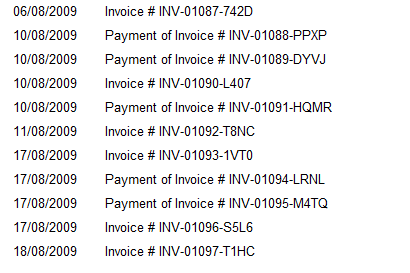
Above is the outcome. Although it is still not quite the result I was after, it was cool to learn how to do this as I may be required to at a later stage. What I was really after was a list displaying the invoices and payments of those in date stamp order.
Category List

Filter by Author
Adam Murchison
Alfwyn Jordan
Arthur Mandisodza
Calum Jacobs
Colin Maitland
David Mochrie
Dominic Liu
Gayan Perera
Harshani Perera
Isaac Stephens
Jaime Smith
Jared Johnson
John Barrencechea
John Eccles
Lauren Withers
Paul Nieuwelaar
Roshan Mehta
Roz Millar
Ryan Blaikie
Ryan Ingram
Sarah Coleman
Sean Roque
Shalane Williams